
Last updated on May 12, 2026
Designing effective quizzes in Canvas starts with a simple question: What are you trying to accomplish? Quizzes aren’t just for grading, they can be powerful tools for learning. Whether you’re using them for quick knowledge checks, low-pressure practice opportunities, or high-stakes exams, well-designed quizzes can reinforce key ideas, help students spot gaps in their understanding, and give you a clearer picture of how your students are progressing.
Before choosing a tool, it’s helpful to consider your goals. Are you aiming for quick comprehension checks, learning reinforcement, deeper application of concepts, or reusable assessments you can build on over time? The effectiveness of a quiz is determined less by the tool you use and more by how well it supports student learning, feedback, and alignment with course objectives.
Canvas currently offers two tools for building quizzes: Classic Quizzes and New Quizzes. While both can support these goals, they differ in features, flexibility, and long-term viability. This Spotlight will highlight key differences between the tools, while focusing on best practices that apply no matter which one you use.
Contents
- 1 Best Practices
- 1.1 How does Artificial Intelligence affect quizzes?
- 1.2 Question Design
- 1.3 Emerging Tools
- 1.4 AI For Instructors
- 1.5 Choosing Between New and Classic Quizzes
- 1.6 How Do I Support Student Learning?
- 1.7 How Do I Provide Effective Feedback?
- 1.8 How Should I Keep My Questions Organized?
- 1.9 Which Quiz Settings Are the Most Effective?
- 1.10 What Should I Keep in Mind When it Comes to Accessibility and Quiz Design?
- 1.11 Final Thoughts
Let’s walk Through it Together
Best Practices
Whichever tool you choose, effective quiz design is key. The goal isn’t just to assess student learning, but to support it.
How does Artificial Intelligence affect quizzes?
As Generative AI tools become more widely available and utilized, it’s important to think about how they may intersect with quiz and exam design. Students may have access to AI tools during quizzes, especially in unproctored or low-stakes environments. The question is no longer how to prevent AI use, but how quizzes function in an environment where AI is readily available.
One helpful starting point is to think about the role of your quiz in the learning experience.
- Formative quizzes: Practice, knowledge checks, and low-stakes activities can still be highly effective, even if students use AI, when they are designed to support learning. In these cases, AI can be part of the process, helping students check their understanding or explore ideas.
- Summative assessments: Graded exams or quizzes may require more structure, depending on what you are trying to measure. If your goal is to assess individual mastery without outside assistance, additional strategies like time limits, question pools, or proctoring may be appropriate.
Question Design
Rather than relying solely on restrictions, start with question design. Questions that ask students to apply concepts, interpret information, explain reasoning, or connect ideas to course-specific examples are generally more meaningful and less susceptible to simple AI-generated responses. In contrast, questions that rely on recall or easily searchable answers are more vulnerable to AI use.
There are also a few practical factors to weigh when deciding how to use quizzes:
- Context of use: Is the quiz open-book, timed, or high-stakes?
- Student expectations: Have you clearly communicated whether AI use is encouraged, allowed, limited, or prohibited?
- Level of learning: Are you assessing foundational knowledge, or deeper understanding and application?
- Risk tolerance: How important is it that responses reflect independent student work?
Emerging Tools
Emerging tools such as agentic browsers add another layer to consider. These tools can actively navigate course content, search for answers, and even complete multi-step tasks on a student’s behalf during a quiz. As these technologies become more common, it may be less realistic to assume that limiting access to information alone will ensure independent work. In this case, it’s doubly important that instructors focus on designing quizzes that require personal reasoning, course-specific context, or demonstration of process, and to communicate clearly with students about expectations for AI tool use in their work.
Proctoring is another option but it comes with tradeoffs, including student stress, access considerations, complicated implementation, and time investment. In many cases, instructors may find that combining thoughtful question design with clear expectations and appropriate quiz settings is more effective than relying on proctoring alone.
AI For Instructors
From an instructor’s perspective, Generative AI can be a tool to support teaching. Instructors can use AI to help draft feedback, identify common errors, or refine rubric language. Tools within Canvas, such as SpeedGrader and emerging AI features, can also streamline parts of the grading process. If you choose to incorporate AI in this way, be sure to review outputs carefully to ensure accuracy, fairness, and alignment with your course goals. AI-generated feedback should support, not replace, your professional judgment, especially for higher-stakes assessments.
For more on this topic, see our tutorials Start a Conversation About Generative AI and Using Generative AI to Enhance Student Learning.
Faculty should be transparent about how they use AI in their courses by clearly communicating where and how it has been used to create course materials, assessments, and communications. This can include a general disclosure in the syllabus or homepage, as well as labeling specific AI-assisted content and explaining its purpose. Instructors should also disclose if AI is used in grading or feedback to maintain clarity and trust with students.
For more details on AI and transparency, see our Spotlight tutorial Teaching with Generative AI: Practical Integration and Student Readiness.
Choosing Between New and Classic Quizzes


Canvas offers two quiz tools: Classic Quizzes and New Quizzes. Both tools support effective quiz design, allow for randomization, multiple attempts, and a range of question types. But they differ in how they handle organization, features, and long-term use.
- New Quizzes is Canvas’s current quiz engine and the focus of ongoing development.
- Classic Quizzes is the original quiz tool. It is stable, familiar, and well-suited for simple assessments or courses with existing question banks.
- In general, New Quizzes is the better choice for long-term course design and new builds, while Classic Quizzes remains a practical option for maintaining existing content.
- Review this FAQ for more on the differences between New and Classic quizzes How are New and Classic Quizzes Different?.
How Do I Support Student Learning?
- Make sure your quiz questions align with your learning objectives and focus on what students should be able to do. Instead of trying to cover everything, prioritize the most important concepts or skills.
- Use a mix of question types when appropriate, but aim to assess more than simple recall. Questions that ask students to apply concepts, interpret information, or work through a scenario tend to provide better insight into their understanding.
- Avoid overly tricky or ambiguous wording, as this can confuse students and make results harder to interpret.
- Depending on which Quiz type you’re going to use, review either of these tutorials:
How Do I Provide Effective Feedback?
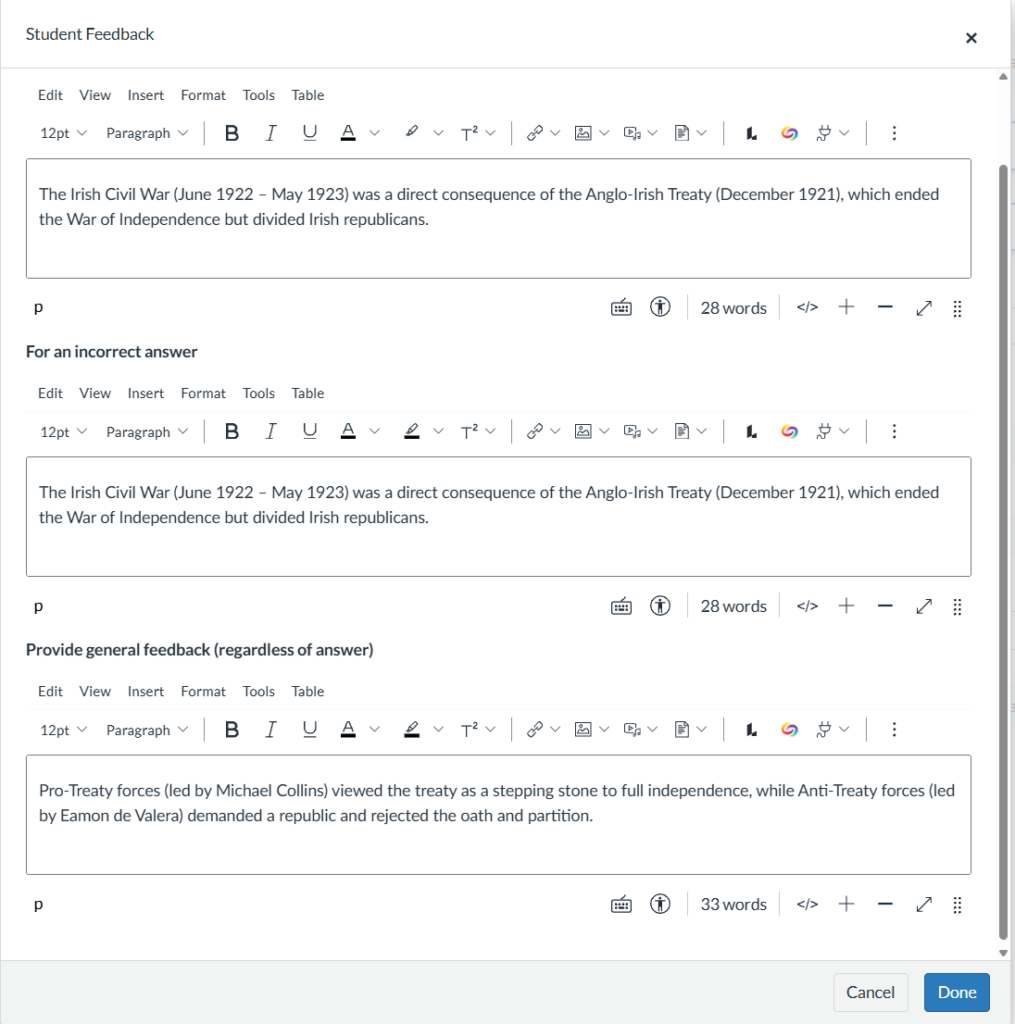
- Feedback is another important part of effective quiz design. When possible, use quizzes as an opportunity for students to learn, not just be evaluated. Providing answer-specific feedback or explanations can help students understand why an answer is correct or incorrect, especially in lower-stakes assessments.
- For some additional assistance in providing feedback, review our Vary Feedback Methods in Canvas tutorial.
- Quizzes can provide valuable insight into student learning. Reviewing quiz results can help identify patterns, such as commonly missed questions or areas of confusion. This information can guide revisions to both your quizzes and your instruction over time. Speedgrader is a tool within Canvas that can make grading quizzes fast and efficient.
- Review our tutorial on Using Speedgrader to Grade Quizzes for more information.
How Should I Keep My Questions Organized?
It’s helpful to build your quizzes with reuse in mind.
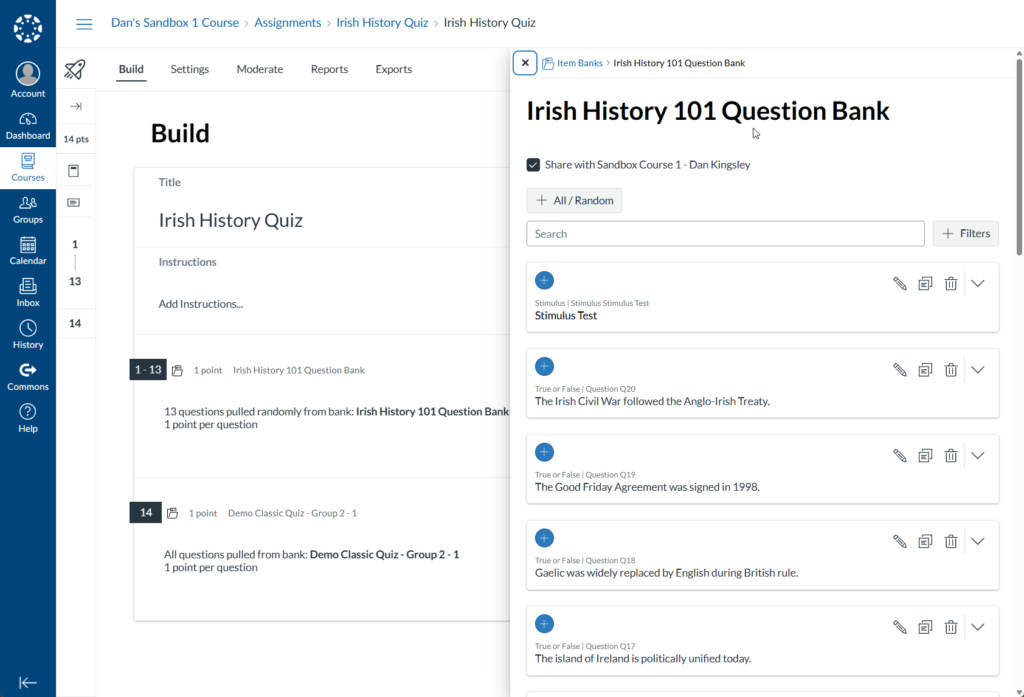
- Organize your questions into banks, question banks in Classic Quizzes, or item banks in New Quizzes
- Group them by topic, unit, or learning objective. This makes it easier to update content over time, reuse questions across courses, and create variations of assessments.
- Review these tutorials to get started:
Which Quiz Settings Are the Most Effective?
While no online testing tool is infallible, there are design choices that can help support academic integrity.
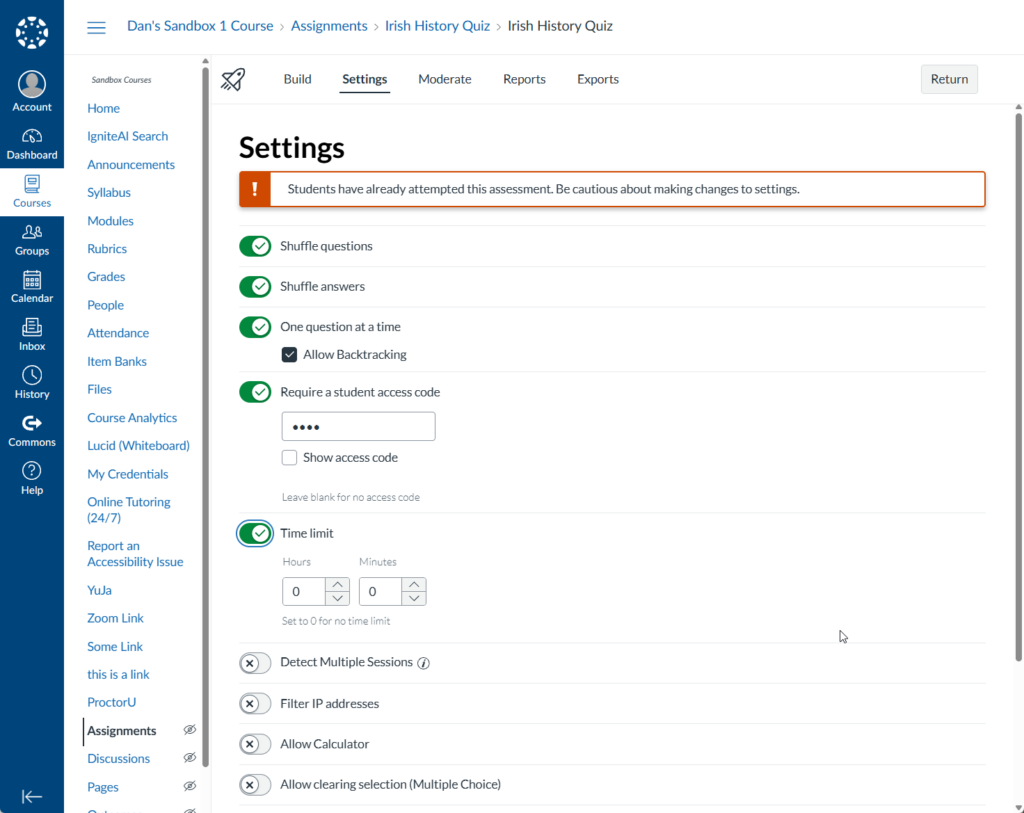
- Randomizing questions from banks and shuffling answer choices can reduce reliance on easily searchable answers.
- Using question types like short answer or multi-step problems. In many cases, designing questions that require application or explanation is more effective than relying solely on restrictive settings.
- Avoid overloading your quizzes with too many rules around timing, attempts, or exceptions. Instead, aim for consistency and clarity so students know what to expect.
- When adjustments are needed, use available tools, such as accommodations in New Quizzes, thoughtfully and consistently.
- For more information on accommodations in quizzes, review our tutorial Use Quiz Accommodations in Canvas.
What Should I Keep in Mind When it Comes to Accessibility and Quiz Design?
Accessibility should also be part of your design process. Review our Spotlight called Incorporate Accessible Principles in Your Courses to learn more.
- When creating quiz questions, keep these key principles in mind:
- Follow all accessibility guidelines for text, images, tables, links, and lists.
- Use plain language to ensure clarity and readability.
- Find alternatives for inaccessible question types, such as hotspot and fill-in-the-blank questions. These may inadvertently disadvantage certain students.
- Do not use multiple underscores (_____) to create blanks in questions. Screen readers will read this as “underscore underscore underscore,” which is confusing for users. Instead:
- Reword the question to avoid the blank entirely.
- Use placeholders like “[blank]” instead of underscores.
- For more accessibility information, please review the Quiz Questions in Canvas module of the Digital Accessibility Made Simple training available in Canvas. This training is a good refresher on course accessibility in general.
- In New Quizzes, you can apply accommodations at the student level, while in Classic Quizzes, these adjustments must be made individually for each quiz.
- To view all CTLD accessibility resources, please visit the Instructional Accessibility Group homepage.
Final Thoughts
Effective quizzes are not defined by the tool you choose, but by how well they support learning. By aligning your quizzes with your objectives, writing clear and purposeful questions, and using Canvas and AI features intentionally, you can create assessments that are both meaningful for students and manageable to maintain over time.